
Every feature exists for one reason: getting you hired
Purpose-built for job seekers. Not generic AI you have to wrestle with prompts. Paste your info, get results you can send today.
Resume Score
ATS Optimization
“3 callbacks in 5 days. Wild.”
Sarah K. - PM
AI Resume Builder
Recruiters spend 6 seconds on your resume. Six, our AI resume builder gets past the robots. Onto the desk of the person who actually makes hiring decisions.
Most resume builders give you a template and leave you staring at a blank page. According to Jobscan research. Over 98% of Fortune 500 companies use applicant tracking systems (ATS) that filter resumes before a human ever sees them -. 75% of resumes are rejected at this stage alone. Ours works differently, paste your work history - messy notes. LinkedIn export, old resume, whatever you have - and paste the job description. The AI rebuilds your experience around what the role actually needs. Not generic bullets, targeted ones, according to a Ladders eye-tracking study. Recruiters spend an average of 6 seconds on an initial resume screen. Focusing on job title, company, dates, and bullet structure. Every output is built to clear that filter.
- ATS resume optimization built to clear filters automatically
- Rebuilt around the exact job description you paste in
- Download as DOCX or PDF - ready to send, no tweaking needed
- Keyword matching so recruiters find you instead of the other way around
AI Resume Builder
How AI Resume Builder Works
Drop in your raw material
Copy-paste your work history, upload an old resume, or import your LinkedIn profile. Formatting doesn't matter, we extract what matters.
Paste the job description
The AI reads it line by line. Pulls out the keywords. Understands what they actually want - not just what they listed.
Get a tailored resume
Every bullet rewritten to match the role. Quantified where possible, formatted to clear ATS filters. Ready to send.
Export and apply
Download as PDF or DOCX, one click. No watermarks, no subscriptions required to export.
AI Resume Builder vs. Alternatives
| Feature | Career Level Up | Other Tools |
|---|---|---|
| Job-specific tailoring | Every resume rebuilt for the specific job posting | Generic templates you fill in yourself |
| ATS optimization | Automatic formatting and keyword matching | Basic templates that may or may not pass |
| Content generation | AI writes and improves your bullets | You write everything from scratch |
| Time to complete | Under 5 minutes per application | 30-60 minutes of manual editing |
AI Resume Builder is best for:
Real resumes, real results
Before and after - the same person, a completely different first impression. Click to view full size.
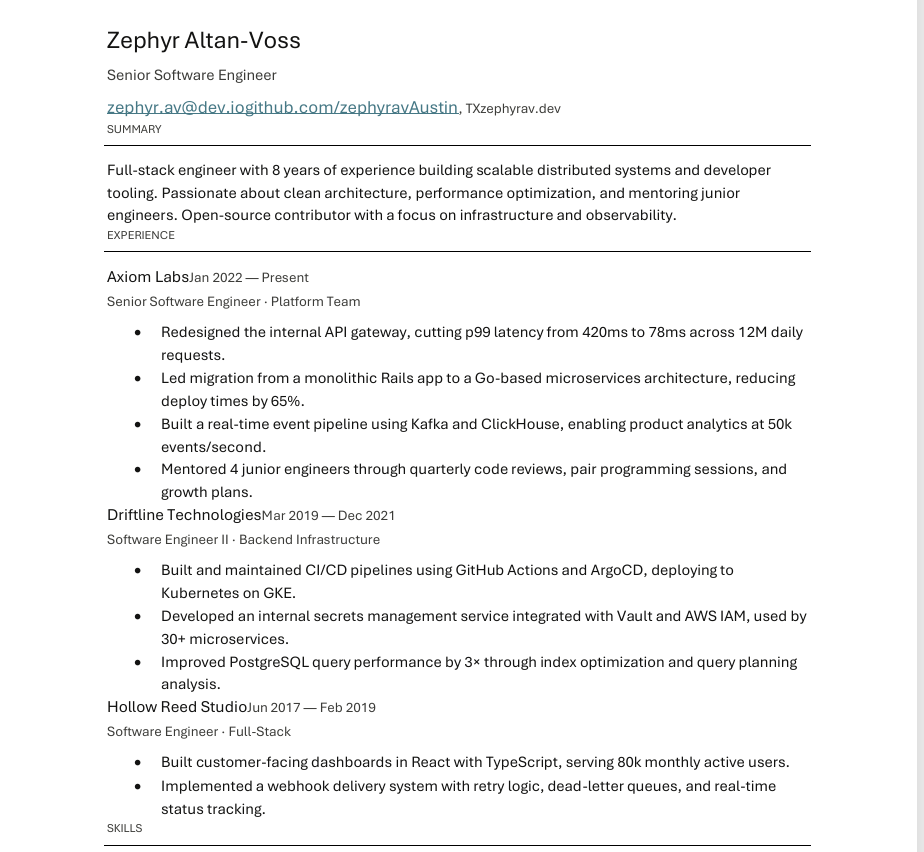
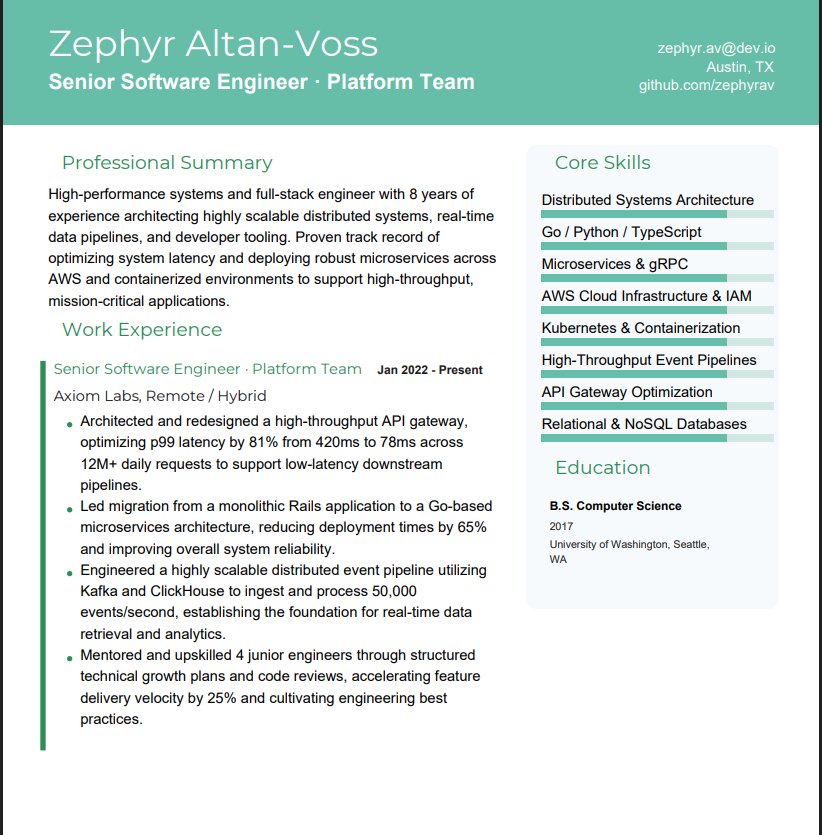
Software Engineer
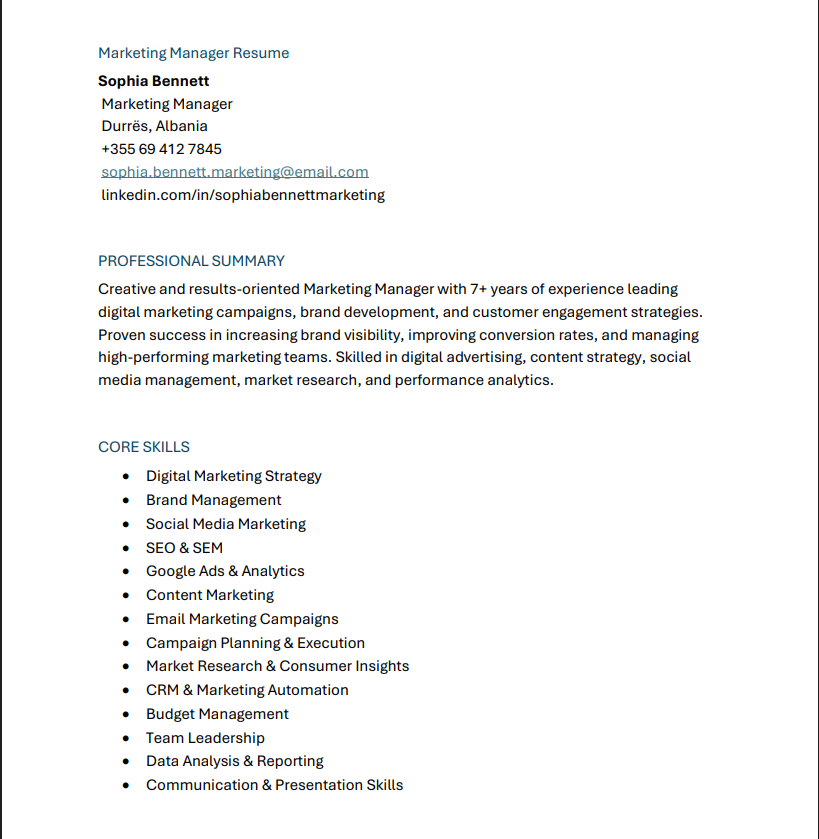
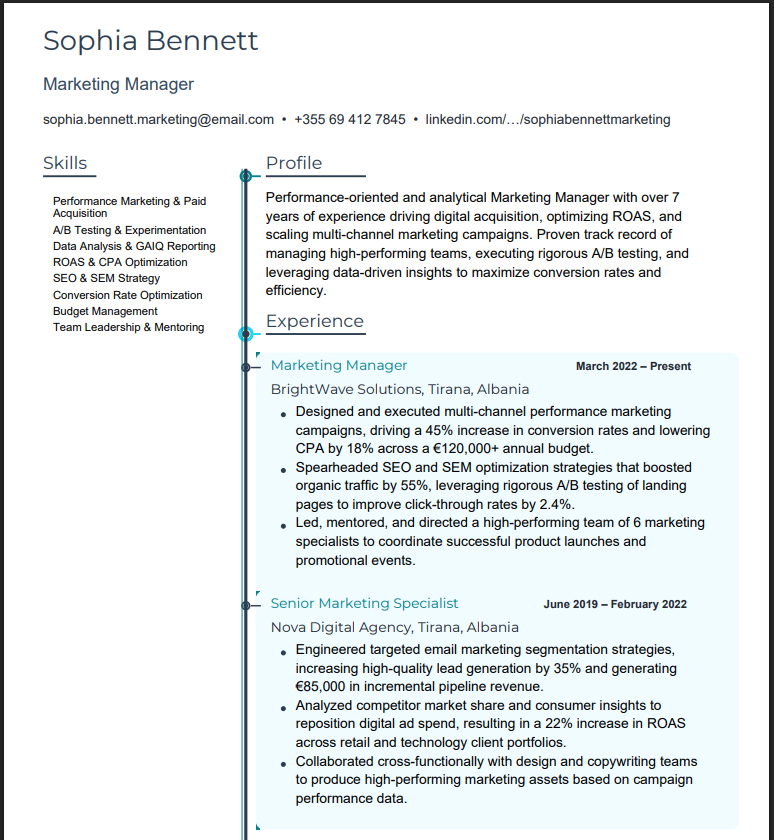
Marketing Manager
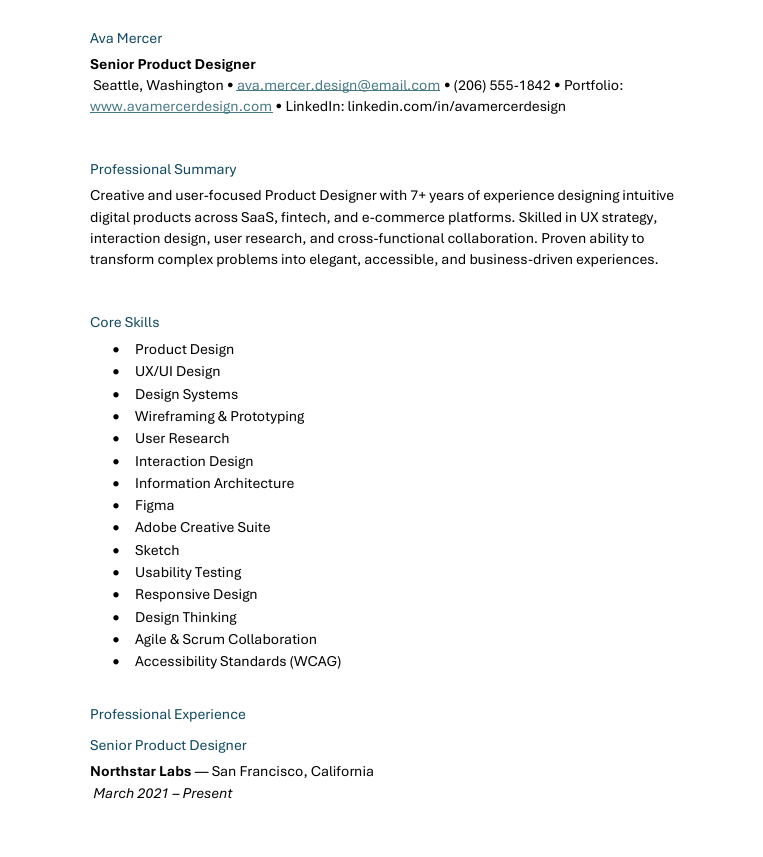
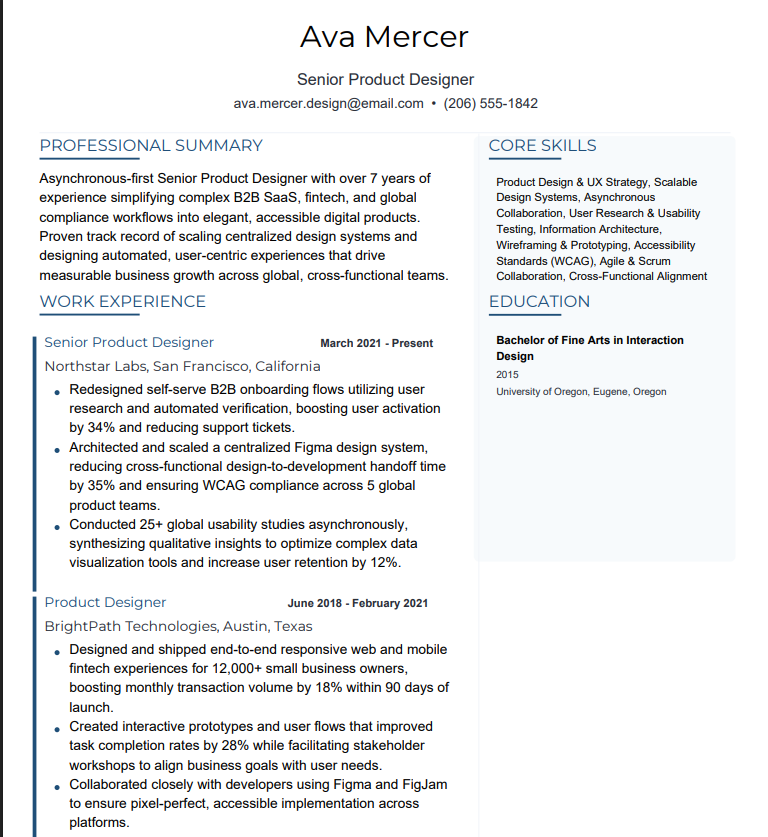
Product Designer
Cover Letter Generator
Cover letters are the worst part of job hunting. Paste the listing, get a letter fine-tuned to produce human-sounding. Non-robotic language that sounds like you actually wrote it. Done in 90 seconds.
Generic cover letters get deleted. According to SHRM (Society for Human Resource Management). Hiring managers consistently cite relevance and specificity as the primary criteria for evaluating cover letters - a generic letter signals low effort and poor fit before a single interview question is asked. The ones that get read connect your specific experience to their specific needs. Our generator does that automatically. It reads the job posting, pulls out what matters. And writes a letter that references the company by name, addresses their requirements directly, and positions you as the solution. All in the time it takes to grab coffee.
- Matches the company vibe - startup energy or corporate polish
- Pulls requirements straight from the job posting
- Sounds like a real person, not ChatGPT on autopilot
- Two minutes, that includes reading it over.
Cover Letter Generator
How Cover Letter Generator Works
Paste the job posting
The AI extracts the company name, role requirements, and what they are really looking for between the lines.
Add your background
Upload your resume or type a few sentences about your relevant experience. We handle the rest.
Pick your tone
Startup casual or corporate formal, confident or humble? Choose the voice that fits the company culture.
Review and send
Read it over, make any tweaks, copy to your clipboard or download. Most people send it as-is.
Cover Letter Generator vs. Alternatives
| Feature | Career Level Up | Other Tools |
|---|---|---|
| Personalization | References company name, role, and specific requirements | Generic templates with [COMPANY NAME] placeholders |
| Writing quality | Trained to avoid AI-sounding phrases and corporate fluff | Obviously machine-generated text that recruiters spot instantly |
| Time per letter | 90 seconds including review | 20-30 minutes writing from scratch |
| Company research | Automatically pulls context from job posting | You research and incorporate manually |
Cover Letter Generator is best for:
Job Search with AI Copilot
You don't need another job board. Our AI copilot finds the right roles for you without three hours of scrolling every night.
Job boards are a time sink. You spend hours scrolling, open 47 tabs, and half the listings are duplicates or already filled. According to LinkedIn Economic Graph data. Job seekers who apply to roles matching 70-80% of listed requirements have significantly higher callback rates than those sending applications indiscriminately. According to the Bureau of Labor Statistics JOLTS report. There are consistently millions of open positions at any given time - the problem is not scarcity of jobs. It's finding the right ones efficiently. Our job search pulls from multiple sources. Filters out the noise, and surfaces roles that actually match your skills and preferences.
- Filter by role, location, salary, remote - the stuff that matters
- Pulls from multiple platforms so you see everything in one place
- Save roles and track where you stand
- Matches based on your actual skills, not just keywords
Job Search with AI Copilot
How Job Search with AI Copilot Works
Set your criteria
Role type, location, remote preference, salary range, company size. Tell us what matters and we filter everything else out.
Get matched listings
AI scans multiple job boards and ranks results by how well they fit your profile. Best matches surface first.
Save and organize
Bookmark roles you want to apply to. Track application status. Keep everything in one place instead of scattered across tabs.
Apply with one click
Generate a tailored resume and cover letter for any saved job without leaving the platform.
Job Search with AI Copilot vs. Alternatives
| Feature | Career Level Up | Other Tools |
|---|---|---|
| Source coverage | Aggregates from multiple job boards in one view | Search each board separately and compare manually |
| Matching quality | AI ranks jobs by actual fit to your skills | Keyword matching that misses context |
| Application tracking | Built-in tracker for saved jobs and status | Spreadsheets or separate tracking tools |
| Resume generation | Create tailored resume from job listing directly | Copy job details to another tool manually |
Job Search with AI Copilot is best for:
Interview Prep Tool
Show up knowing what they're going to ask, not guessing, knowing. Our interview prep tool uses AI that adapts to the exact role you're going after.
AI interview prep generates practice questions directly from the job description you paste in - not a generic question bank - then scores your answers with specific feedback on structure. Relevance, and completeness. That distinction matters: generic question banks give you the same 200 questions every other candidate is memorizing. Role-specific questions are what the interviewer already has written down. According to SHRM research. Candidates who practice structured responses using the STAR method perform significantly better in behavioral interviews than unprepared candidates. According to LinkedIn Talent Solutions data. Structured behavioral preparation - anticipating role-specific questions - directly correlates with offer rates.
- AI mock interview generates questions from your actual job description - not a generic bank
- Behavioral, technical, situational - covers every question type
- Get scored on every answer with specific notes on what to fix
- Unlimited free practice sessions - run it as many times as you need
Interview Prep Tool
How Interview Prep Tool Works
Enter the role details
Paste the job description or just describe the role. The AI identifies what question types they're likely to ask.
Choose your focus
Behavioral questions, technical deep-dives? Situational scenarios? Pick what you want to practice or do all three.
Answer and get feedback
Type or speak your responses. AI evaluates clarity, structure, relevance, and completeness with specific improvement suggestions.
Drill until confident
Repeat as many times as needed. Track your scores improving, build muscle memory for the real thing.
Interview Prep Tool vs. Alternatives
| Feature | Career Level Up | Other Tools |
|---|---|---|
| Question relevance | Generated from actual job description requirements | Generic question banks for broad categories |
| Feedback quality | Specific notes on what to improve in each answer | Pass/fail or no feedback at all |
| Practice modes | Text and voice responses supported | Text-only or requires video recording |
| Unlimited practice | Run as many sessions as you want | Limited sessions or per-question pricing |
Interview Prep Tool is best for:
LinkedIn Profile Optimization
Your LinkedIn is your storefront, right now recruiters are scrolling right past it. Our LinkedIn profile optimization fixes that so they stop and message you instead.
A free LinkedIn profile optimizer rewrites your headline. Summary, and experience bullets with the keywords recruiters actually type into LinkedIn Recruiter -. You appear in searches instead of being filtered out. LinkedIn SEO works the same way as web SEO: the right keywords in the right places determine whether you rank on page 1 of recruiter results or disappear entirely. According to LinkedIn Talent Solutions. Over 75% of recruiters use LinkedIn as their primary candidate sourcing channel. And profiles with optimized headlines appear up to 40x more frequently in recruiter searches than unoptimized ones. According to LinkedIn Economic Graph research. Members in the top 10% for profile strength receive 5x more recruiter connection requests. The difference between showing up and not showing up is usually three things: your headline keywords. Your skills list, and the first 300 characters of your About section. The optimizer handles all three.
- AI rewrites your headline and summary with the exact keywords recruiters search
- Covers all high-impact sections: headline, About, experience bullets, skills
- Optimizes for search visibility and human readability - not keyword stuffing
- Measurable improvement in profile views and recruiter outreach after updating
LinkedIn Profile Optimization
How LinkedIn Profile Optimization Works
Paste your current profile
Copy your current headline, About section, and experience bullets and paste them in. Takes 2 minutes and no LinkedIn login required.
Tell us your target
What roles do you want recruiters to find you for? The AI optimizes for those specific searches.
Get a rewrite
New headline formula, keyword-rich summary. Improved experience bullets, all written to sound natural while ranking higher.
Copy and update
Copy each section to LinkedIn, takes 10 minutes to implement. Start seeing results within days.
LinkedIn Profile Optimization vs. Alternatives
| Feature | Career Level Up | Other Tools |
|---|---|---|
| Headline optimization | Keyword-rich formula proven to increase search visibility | Generic advice like"be specific" |
| Keyword research | Identifies the exact terms recruiters search for your target roles | You guess which keywords matter |
| Section-by-section guidance | Specific rewrites for headline, summary, experience, skills | General tips without actionable copy |
| Results timeline | Profile view increases typically within 1-2 weeks | No performance tracking or guarantees |
LinkedIn Profile Optimization is best for:
Document Analyzer
Upload your resume, get a score. No sugar-coating. We tell you exactly what's broken and hand you the fix.
You can't fix what you can't see. According to Jobscan research. 75% of resumes are rejected by ATS before reaching a human reviewer - most because of keyword gaps. Formatting issues that are invisible to the applicant. According to the Ladders eye-tracking study. Recruiters spend an average of 6 seconds on initial resume review. With 80% of that time focused on job title, company name, start and end dates, and bullet structure. Our analyzer scans your resume for the exact issues that get applications trashed: vague bullets. Missing keywords, formatting that confuses ATS systems, and weak phrasing that undersells your experience. You get a score, a list of problems, and specific fixes for each one.
- Line-by-line teardown with specific suggestions you can use today
- ATS compatibility score so you know where you actually stand
- Side-by-side comparison against the job description
- Works with PDF, DOCX, and LinkedIn exports
Document Analyzer
How Document Analyzer Works
Upload your document
PDF, DOCX, or LinkedIn export, drag and drop. We parse the content and structure automatically.
Add the job description (optional)
Paste the role you're targeting for a side-by-side gap analysis. See exactly where your resume falls short.
Get your score and breakdown
Overall ATS compatibility score plus section-by-section analysis. Each issue identified with severity and specific fix.
Fix or rebuild
Make the changes yourself or click to auto-fix with our resume builder. Your choice.
Document Analyzer vs. Alternatives
| Feature | Career Level Up | Other Tools |
|---|---|---|
| Analysis depth | Line-by-line review with specific fix for each issue | Generic score with vague improvement tips |
| Job matching | Side-by-side comparison against specific job description | No job-specific analysis |
| Fix integration | One-click to apply fixes in resume builder | Manual implementation of suggestions |
| File format support | PDF, DOCX, LinkedIn exports, plain text | Often PDF-only or requires specific format |
Document Analyzer is best for:
Got questions? Good.
Career Level Up builds interview questions directly from the job description you paste in - not a generic bank of common questions. You get behavioral, technical, and situational questions calibrated to the exact role, plus scored feedback on every answer. Free to start, no credit card.
Yes. Career Level Up gives you a full free tier - no credit card, no watermarks, no locked exports. Build an ATS-optimized resume in under 5 minutes by pasting your work history and a job description. The AI handles keyword matching and formatting automatically.
A LinkedIn optimizer rewrites your headline, summary, and experience sections with the exact keywords recruiters search for when looking for candidates like you. Our tool identifies the terms specific to your target roles and works them in naturally - not keyword stuffing. Profiles with optimized headlines appear up to 40x more often in recruiter searches according to LinkedIn Talent Solutions data.
PDF and DOCX. Both pass ATS and look sharp. The DOCX is editable in Word or Google Docs if you want to make tweaks.
That is the whole point. Paste a new job description, get a new resume built around that role. Different job, different resume. Takes about 2 minutes each.
Filter by remote, hybrid, or on-site. We pull from multiple platforms so you catch roles you would miss sticking to one board.
Export your LinkedIn as a PDF and upload it. We pull your experience, education, and skills automatically. One step.
Upload your resume and we score it on ATS compatibility, keyword density, formatting, and content quality. You get a number plus line-by-line notes on what to fix.
You've read enough. Time to use it.
Resume, cover letter, interview prep, LinkedIn optimizer - all free to start. No credit card, no reason to wait.